 Using the Document
Builder
Using the Document
Builder
Using the Document
Builder
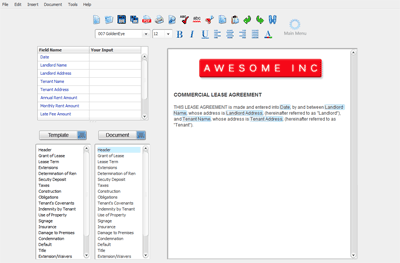
The document builder screen is divided into four areas: the toolbar, the field list, the section list and document text window.
The toolbar provides shortcuts to frequently used commands such as opening files, printing documents and formatting text.
The field list is used to update fields in your document .
The section list contains a list of sections available for your document (left side) and a list of sections included in your document (right).
The document text window contains actual text for the highlighted section. The text window can be used to customize your document by adding new text or removing existing text.